

In today’s hyper-connected world, customers expect fast, seamless, and personalized experiences across any channel, at any time. For businesses, meeting these expectations while managing costs, maintaining flexibility, and ensuring service continuity has become a major challenge.
Traditional contact center systems, often rigid and costly to maintain, are no longer equipped to support the dynamic nature of modern customer journeys. That’s where CCaaS, Contact Center as a Service, steps in.
As a cloud-based model, CCaaS is redefining the way organizations interact with their customers by providing flexible, scalable, and omnichannel-ready cloud solutions, without the heavy IT overhead.
Whether you’re a customer service director, IT manager, or transformation leader, understanding CCaaS is essential to future-proof your contact center strategy and elevate the customer experience.
Key takeways
- CCaaS (Contact Center as a Service) is a cloud-based platform that centralizes all customer interactions — voice, email, chat, SMS and messaging — in one place
- Unlike traditional on-premise systems, CCaaS requires no physical infrastructure and scales up or down based on your business needs
- Key benefits include faster deployment, lower IT costs, built-in omnichannel, and continuous updates without downtime
- CCaaS is the right move for any team managing growing interaction volumes across multiple channels
- INO CX is a CCaaS platform built for teams who want power and simplicity — ready in days, not months
What is CCaaS? Definition and Specificities
CCaaS, or Contact Center as a Service, is a cloud-based solution that enables organizations to manage customer interactions across multiple channels from a single, centralized platform.
Whether it’s an inbound or outbound interaction, via voice, email, SMS, chat, social messaging, or other digital channels, a CCaaS platform allows you to centralize and streamline all communications in one unified environment.
In essence, it’s a SaaS (Software as a Service) solution built specifically for contact center operations, offering scalability, flexibility, and ease of use, without the heavy infrastructure or maintenance burden of traditional systems.
Unlike traditional on-premise systems, CCaaS is hosted and maintained by a third-party provider. This means companies can access advanced contact center capabilities without needing to invest in costly infrastructure or perform complex updates internally.
Key Characteristics of CCaaS:
- Cloud-native architecture: Delivered entirely via the cloud, with no physical servers to maintain.
- Subscription-based model: Pay only for what you use, scaling resources up or down based on business needs.
- Centralized omnichannel management: Unify customer interactions across voice, email, chat, social messaging from a single interface.
- Rapid deployment: Launch or evolve your contact center quickly, without long installation cycles.
- Remote-ready: Enable agents to work securely from anywhere, with just a browser and internet connection.
- Always up to date: Continuous platform enhancements and security updates are handled by the provider.
In short, CCaaS enables businesses to focus on delivering exceptional customer experiences, while the technology and infrastructure are taken care of behind the scenes.
CCaaS vs Traditional Contact Center Solutions
The way businesses manage customer service is evolving, and so should the tools they use. Traditional contact centers, often built on legacy on-premise infrastructure, are no longer suited for the agility, scalability, and omnichannel engagement today’s customers expect.
Here’s how CCaaS compares to a traditional contact center solution:
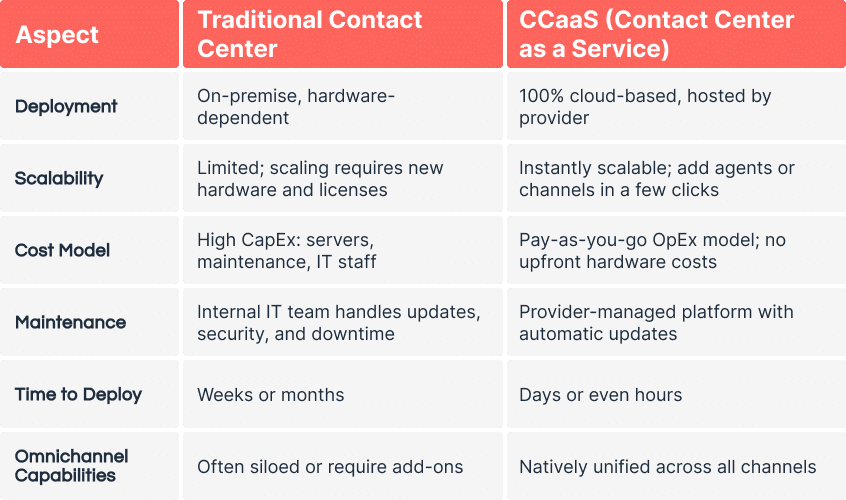
In short:
CCaaS offers the agility, resilience, and customer-centric capabilities modern organizations need without the cost or complexity of managing infrastructure. It’s built for businesses that want to evolve fast and deliver a seamless customer experience on every channel.
Use Cases: How Businesses Use CCaaS
Whether you’re managing a high-volume customer service operation or launching outbound campaigns, CCaaS offers the flexibility and intelligence to adapt to any scenario. Its cloud-native architecture and omnichannel capabilities make it ideal for organizations across sectors and sizes.
Here are some of the most common and impactful CCaaS use cases:
1. Multichannel Customer Support
With CCaaS, you can deliver seamless, consistent support across voice, email, SMS, chat, and messaging apps like WhatsApp and Facebook Messenger, all from a single, unified interface. Eevery interaction is part of a trackable, coherent customer journey, ensuring continuity no matter how the conversation evolves.
This approach is ideal for companies looking to engage customers on their preferred channels, while maintaining full visibility and performance control.
💡 Example: A retail brand offers real-time support on WhatsApp for order inquiries, while also managing phone calls and emails from the same dashboard. A customer can start a conversation on WhatsApp, receive a follow-up email, and continue by phone, without repeating information. The agent has full context across all touchpoints, and their performance is evaluated holistically, regardless of channel.
2. Inbound Call Handling and Routing
Use intelligent routing rules to direct calls based on agent skills, language, location, or customer history. IVRs and automation reduce wait times and improve first-contact resolution.
💡 Example: A utility provider routes technical support calls to specialized teams while automating billing inquiries via voice bots.
3. Outbound Campaigns (Sales, Collections, Payment Follow-ups)
Automate outbound voice calls and SMS campaigns for lead generation, customer reactivation, appointment scheduling, or payment collection, without overloading your agents. With CCaaS, you can proactively engage customers, personalize interactions, and optimize agent time through smart dialing and campaign automation.
💡 Example: An energy provider launches automated SMS and voice campaigns to follow up on unpaid bills. Customers receive a personalized message with a secure payment link via SMS or email. If needed, agents can take over in real time and assist with payment, while tracking results in a centralized dashboard.
4. Remote and Distributed Teams
Empower your agents to work from anywhere, whether at home, in the office, or across borders. With a CCaaS platform, agents have secure, browser-based access to all contact center tools, including call handling, customer data, and supervision features. No local installation or complex setup is required, a simple internet connection is all they need.
💡 Example: A global travel company operates a multilingual contact center with agents located in different time zones around the world. Thanks to a cloud-based CCaaS platform, all agents are connected to the same interface, have access to real-time customer data, and are fully supported by remote supervision tools, ensuring consistent service delivery, wherever they are.
5. CRM-Driven Personalization
Thanks to 360° customer views and CRM integration of CCaaS, agents can personalize every interaction with full access to customer history, preferences, and past conversations.
💡 Example: A subscription service offers tailored upsell options during support calls based on customer data retrieved in real time.
Key Features of a CCaaS Platform
A modern CCaaS solution should do more than just handle calls, it should empower your teams, streamline operations, and elevate the customer experience across every touchpoint. Here are the essential features to look for:
Omnichannel Communication
Centralize all customer interactions, voice, email, SMS, chat, and messaging apps like WhatsApp or Messenger within a single, unified interface for consistent and seamless experiences.
Intelligent Routing and IVR( interactive voice reponse)
Automatically route customers to the right agent based on their profile, language, request type, opening hours, location, and agent availability. Use interactive voice response (IVR) systems and self-service options to reduce wait times, optimize resource allocation, and improve first contact resolution.
Real-Time Supervision and Monitoring
Track activity across channels with live dashboards, customizable KPIs, call listening, whisper coaching, and agent performance analytics, whether teams are remote or onsite.
360° Customer View and CRM Integration
Access complete customer history, preferences, and interaction logs directly from the agent interface, whether through built-in CRM tools or seamless integrations with platforms like Salesforce, HubSpot, or your own custom systems. Thanks to connectors, APIs, and webhooks, all data is synchronized in real time to deliver fully contextualized and personalized interactions.
Automation and AI Capabilities
Leverage features like speech-to-text, smart scripting, auto-responses, campaign automation, and call blending to boost agent productivity and streamline operations.
Remote-Ready Access
All agents and supervisors can access the platform securely from a browser with no local software required, making it ideal for remote and distributed teams.
Advanced Reporting and Analytics
Monitor performance in real time and generate detailed reports on agent activity, channel efficiency, campaign outcomes, and customer satisfaction.
These core features of CCaaS form the foundation of a high-performing contact center and help you deliver fast, consistent, and personalized service at scale.
How to Choose the Right CCaaS Solution
Choosing the right CCaaS platform is a strategic decision that goes beyond features. The ideal solution should align with your business goals, integrate seamlessly into your ecosystem, and scale effortlessly as your customer experience evolves.
Here’s a practical guide to help you evaluate your options effectively:
1.What channels do you use, and where are you headed?
→ If you’re starting with multiple channels (voice, email, chat, messaging):
Choose a CCaaS platform that is natively omnichannel, not a mix of disconnected tools. Look for shared routing, reporting, and supervision across all channels to ensure a consistent experience.
→ If you’re starting with just voice (or voice and email):
Pick a CCaaS that supports omnichannel expansion, even if you don’t need it today. You should be able to add channels like WhatsApp, SMS, or live chat later without changing platforms or contracts.
🛠 Tip: Look for modular pricing so you only pay for the channels you use, with the flexibility to scale when you’re ready.
2. Who will use the CCaaS platform?
→ Customer service, support, or BPO teams:
Look for features like smart routing, supervision tools, and case tracking.
→ Sales or outbound teams:
Prioritize campaign automation, call blending, and CRM integration.
3. Is your team remote, hybrid, or on-site?
→ Remote or hybrid team:
Choose a cloud-native, browser-based platform that works without VPNs or software installs.
What to look for:
- Visibility tools: See agent status in real time (on-site, remote, active, on break, etc.)
- Integrated collaboration features: Internal chat, screen sharing, team notifications
- Remote supervision: Live call monitoring, whisper coaching, flash messages
4. What’s the size of your team, and does it change?
→ Stable team:
Look for a user-based pricing model with predictable monthly costs.
→ Seasonal or rotating team:
Choose a platform with flexible licensing that lets you add or remove users easily, ideal for temporary staff or high-turnover operations.
🛠 Tip: Pay attention to the pricing model:
Some providers charge per named user (1 license = 1 fixed user), while others offer concurrent user models (licenses shared across rotating agents).
If you operate in shifts or manage a large part-time team, anonymous user pricing is often more cost-effective.
5. What are your integration needs?
Most CCaaS providers will say they “integrate with your CRM”, but the real question is: how well?
Ask yourself:
- Does the integration only open a contact record?
- Can agents see full customer history, trigger actions (e.g. sending SMS or emails), or update CRM data directly from their interface?
- Is the integration bi-directional and real-time?
If your teams rely on tools like Salesforce, HubSpot, Zendesk, or internal systems, you need more than a checkbox, you need functional integration that improves agent productivity and customer insight.
🛠 Tip:
Choose a CCaaS platform that offers:
- Prebuilt connectors with deep functionality
- A complete and well-documented API
- Webhook support for real-time data sync and event triggers
This ensures your platform can evolve with your business and connect seamlessly to your ecosystem, now and in the future.
6. What reporting and visibility do you need?
→ Real-time management is key:
Choose a platform with live dashboards, KPI tracking, and coaching tools.
→ Just need reports:
Look for scheduled reporting and export features, with filters by team or channel.
🛠 Tip: Custom KPIs and multi-team dashboards are essential for growing operations.
7. Do you manage multiple teams, sites, or clients (like in a BPO model)?
If you’re running a BPO, managing multiple contact centers, or simply need to separate teams (e.g. by brand, language, geography), you’ll need more than user roles: you need true operational segmentation.
Ask yourself:
- Can I isolate data, reporting, and routing rules per team or site?
- Can supervisors only see and manage their assigned agents?
- Can I assign different rights, dashboards, and KPIs by group?
🛠 Tip:
Look for a CCaaS platform that supports:
- Workforce segmentation (per team, project, site, or client)
- Granular permissions for agents, supervisors, and admins
- Data and dashboard isolation between business units or clients
This ensures security, operational clarity, and efficient multi-team management, especially in outsourcing or multi-brand environments.
8. What support and onboarding do you expect?
→ Need full assistance:
Look for guided onboarding, training, and dedicated support.
→ Have internal IT capacity:
Ensure access to documentation, admin tools, and responsive helpdesk.
🛠 Tip: Choose a provider known for CX expertise, not just generic support.
9. How do you plan to control costs, and what pricing model works for you?
After all, we all have a budget. It’s not just about whether a solution is expensive or not, it’s about finding the best offer for what you actually need.
There are several pricing models in the CCaaS market:
- Per-user pricing: Make sure you know if it’s named user (one license per person) or concurrent user (shared licenses for rotating staff).
- Pay-as-you-go: Ideal if your activity varies, pricing based on usage (minutes, interactions, campaigns).
- All-inclusive vs. modular: Some solutions charge extra for channels, integrations, or advanced reporting, while others bundle everything.
Also consider the contract terms:
- Are you committing for 12 months? 36?
- Is there flexibility to scale up or down without penalties?
🛠 Tip:
Choose a provider that’s transparent and flexible, with a pricing structure that fits your team size, activity level, and future plans, so you get the best value, not just the best price.
What Makes INO CX Different?
INO CX is a CCaaS platform designed to meet the evolving needs of modern contact centers, whether you’re starting simple or scaling complex operations. Here’s what sets us apart:
Omnichannel by design
INO CX brings together voice, email, SMS, chat, WhatsApp, and social messaging in one unified interface. Every channel is natively integrated, ensuring consistent customer journeys, centralized reporting, and a seamless agent experience.
Segmentation and access control
Easily manage separate teams, brands, projects, or clients with granular rights management. Control what each user sees and does. It’s ideal for BPOs, multi-site operations, or any organization that needs clean separation within one platform.
Advanced supervision & quality monitoring
Built-in supervision and quality monitoring features make it possible to track performance in real time, support agents proactively, and continuously improve service quality.
Remote-ready
Agents and supervisors can connect securely from anywhere via a simple browser without software installs needed. Which is perfect for remote, hybrid, or globally distributed teams.
Scalable architecture
INO CX grows with you. Add users, channels, or features instantly without disrupting your operations. Scale across languages, locations, and use cases with confidence.
Powerful API integrations & connectors
Easily connect to Salesforce, Zendesk, and other major CRMs, or build custom integrations via INO’s complete API and webhook support. Enable agents with real-time context and trigger workflows directly from the platform.
Integrated collaboration tools
Improve internal communication with chat, visio-conferencing, shared notes, and contextual handovers within the interface. Agents and supervisors stay aligned, no matter where they are.
Customizable reporting & dashboards
Track what matters to you. Build dashboards by role, team, or campaign, and monitor performance across all channels in real time, or generate tailored historical reports for deeper insights.
Simple, transparent, and flexible pricing
No hidden fees. Pay only for what you use, with modular plans that scale with your business while keeping your costs easy to control.
Responsive, expert support
From onboarding to optimization, our team is here when you need us. Get access to real CX and technical experts who understand your business and are ready to support your goals.
Ready to Take the Next Step?
Whether you’re launching your first CCaaS or looking to modernize an existing one, INO CX gives you the tools, flexibility, and support to do it right on your terms.
Let’s build a smarter, simpler, and more connected customer experience together.