June 11, 2026


- These capabilities apply across queue recordings, outbound voice campaigns, and voicemails, not just inbound support calls
AI-powered voice recording analysis is the use of speech recognition and natural language processing (NLP) to automatically convert call audio into text, then extract meaning from it: identifying the topic, the customer's emotional tone, and the key outcomes of the conversation. In a contact center, this typically combines three connected capabilities: automatic transcription (speech-to-text), sentiment analysis (emotional tone scoring), and automatic summarization (a structured synthesis of the interaction).
Unlike manual call review, which only covers a small sample of interactions, AI-based analysis can be applied to 100% of recordings, across inbound queues, outbound voice campaigns, and voicemail messages, at a fraction of the time and cost.
Automated transcription and summaries remove the most time consuming part of post-call work. Instead of three to five minutes typing notes after every call, agents review and validate an AI generated summary in under a minute. Automation tied to AI insights has been linked to response and resolution time reductions of up to 52%, since agents and supervisors act on a ready made summary instead of replaying a recording from scratch.
AI transcription follows the same core process regardless of the recording type, but how it gets triggered differs depending on the channel.
1. Audio capture. The call, voicemail, or campaign recording is captured by the contact center platform, either in real time as the conversation happens or as a stored file once the interaction ends.
2. Speaker separation. The system identifies and separates each speaker in the recording (agent and customer), so the resulting transcript is structured by speaker rather than a single block of text.
3. Speech to text conversion. An automatic speech recognition (ASR) engine converts the audio into text, trained to handle accents, background noise, and industry specific vocabulary.
4. Text structuring. Natural language processing (NLP) cleans up the raw transcript: punctuation, formatting, and timestamps are added so the text is readable and searchable.
This same pipeline applies across three distinct recording types:
- Queue recordings: inbound calls handled through a call queue or IVR, transcribed automatically once the call ends.
- Voice campaign recordings: outbound calls placed as part of a campaign, transcribed individually so each interaction can be reviewed or aggregated for campaign level reporting.
- Voicemails: messages left when no agent is available are transcribed the same way as a live call, turning an audio file that would otherwise require manual playback into text an agent can scan in seconds.
Transcription can run in two modes. Real time transcription generates text as the conversation unfolds, which is what powers live agent assist tools and in call alerts. Post call transcription processes the recording after it ends, which is sufficient for QA, summaries, and reporting use cases that do not require immediate action.
Sentiment analysis uses natural language processing and, on voice recordings, acoustic analysis to determine whether a customer's tone is positive, negative, or neutral. Beyond word choice, AI on voice recordings also evaluates pitch, pace, volume, and pauses, since vocal cues often carry emotional signals that the words alone do not show.
The process works in three steps:
1. Signal extraction. The system analyzes the transcript for keywords, phrasing, and context, while also analyzing the audio itself for tone, pitch variation, speaking rate, and silences.
2. Sentiment classification. Each interaction, or each segment within it, is classified as positive, negative, or neutral, giving supervisors a clear read on the customer's emotional state without having to listen to the call.
3. Aggregation and trend detection. Individual results are compiled across agents, queues, or campaigns to reveal patterns over time, not just a single call's outcome.
The table below shows how a detected signal typically translates into action inside a contact center platform.
| Signal Detected | Typical Action Triggered |
|---|---|
| Sharp drop in sentiment mid call | Real time alert to the supervisor for possible intervention |
| Consistently negative sentiment on a queue | Flagged for review of scripts, staffing, or wait times |
| Negative sentiment tied to a specific keyword or product | Routed to the relevant team as a recurring issue report |
| Sentiment shifts from negative to positive within a call | Logged as a coaching example of successful de escalation |
| Negative voicemail or campaign call | Prioritized in the callback or follow up queue |
An automatic summary is a structured synthesis generated by AI from the call transcript, condensing a multi minute conversation into a short, readable recap. Unlike a transcript, which is a near word for word record of what was said, a summary is an interpretation of what mattered.
The generation process follows the same logic across queue calls, voice campaigns, and voicemails:
1. Input. The summary engine works from the transcript, the call metadata (duration, queue, agent, campaign), and predefined business context, not the raw audio itself.
2. Extraction. The AI identifies the reason for the contact, the key facts mentioned (account number, product, dates, amounts), any commitments made by the agent, and the customer's overall sentiment.
3. Structuring. These elements are organized into a consistent, readable format rather than a free text block, so every summary follows the same structure regardless of who handled the call.
4. Delivery. The finished summary is pushed directly into the CRM record, attached to the customer's file within seconds of the call ending.
A typical AI generated summary includes:
- Reason for contact: what the customer called, called back, or left a voicemail about
- Key details: account references, products, dates, amounts mentioned
- Outcome: how the interaction was resolved, or what remains pending
- Commitments made: any follow up the agent promised
- Sentiment: the overall tone of the conversation
The time impact is significant: call wrap up traditionally takes two to four minutes of manual note taking per interaction. With an automatic summary already drafted, that step becomes a 20 to 30 second review: the agent reads it, adjusts if needed, and validates, before moving to the next call.
Before comparing tools, the real first question is what problem you are trying to solve. AI on voice recordings is not one single feature, it is a set of capabilities, and the right starting point depends on the objective:
- Reduce after call work and free up agent time → automatic summaries should be the priority, since this is what directly cuts the two to four minutes of manual note taking per call.
- Catch dissatisfaction before it becomes churn → sentiment analysis matters most, especially applied consistently across queues and campaigns rather than a sample.
- Prove compliance and pass audits more easily → full coverage transcription is the priority, since every call, not just a sample, needs to be checkable against required disclosures.
- Speed up coaching and reduce ramp time for new agents → searchable transcripts paired with sentiment scores give team leads concrete, timestamped examples instead of vague feedback.
- Stop losing context between channels and handoffs → CRM integrated summaries matter most, so the next agent has the full picture without replaying anything.
Whether AI on voice recordings is worth the investment depends on volume and current friction, not company size alone.
It is generally worth adopting when:
- Supervisors are reviewing less than 10% of interactions manually and have no visibility into the rest
- Agents are losing 30 to 60 minutes a day, collectively, to manual after call note taking
- Voicemails or campaign callbacks are prioritized by gut feeling rather than urgency or sentiment
- The business cannot currently prove compliance across all interactions, only a sample
- Customer context is regularly lost between channels or during agent handoffs
It may not be worth it yet when:
- Call volume is low enough that every recording is already reviewed individually by a human
- There is no CRM or system to receive structured summaries, so the output would have nowhere useful to land
- The team has no defined consent or data retention process in place, since this needs to exist before transcription starts, not after
For most contact centers handling a meaningful volume of calls, at least one of the "worth adopting" signals is already a daily friction point. The return is rarely about the technology itself, it comes from what the time saved and the consistency gained are redirected toward: faster resolutions, earlier intervention on at risk customers, and coaching that is based on evidence instead of memory.
| Criterion | What to check |
|---|---|
| Transcription accuracy | Performance on your actual language, accents, and industry vocabulary, not just a generic benchmark |
| Coverage of recording types | Whether the solution handles queue calls, voice campaigns, and voicemails natively, or only live inbound calls |
| Sentiment depth | Whether scoring combines transcript analysis with acoustic signals like tone and pace, not keywords alone |
| CRM and tool integration | Native integration with your existing CRM, or a fragile workaround via a third party connector |
| Data residency and consent | Where data is hosted, how long it is retained, and whether disclosure and consent obligations are handled by the platform |
| Customization | Whether the business context (products, contact reasons, mandatory disclosures) can be configured, not just a generic summary template |
Deploying AI transcription, sentiment analysis, and automatic summaries does not require rebuilding a contact center platform from scratch. It typically follows a structured rollout in five steps.
1. Audit your current recording setup. Confirm which interactions are already recorded today: queue calls, voicemails, outbound campaigns, on which platform, and in what format. This is the foundation everything else builds on.
2. Define data and consent rules. Recording and processing a call is the collection of personal data, which means it falls under applicable data protection regulation. Three principles are non negotiable before transcription starts:
- Legal basis and prior notice. Every caller must be informed before the recording begins, typically through an automated message at the start of the call, and the processing must rest on a valid legal basis: consent, legitimate interest, or a contractual or regulatory obligation depending on the context.
- Minimization. Recording every single call by default without justification is rarely compliant. The scope of what is recorded and processed by AI should match the actual purpose, whether that is quality monitoring, training, or dispute resolution.
- Retention limits. Recordings and transcripts cannot be kept indefinitely. Retention periods vary by jurisdiction and purpose, but they should always be defined upfront and configured to delete automatically once they expire, rather than relying on manual cleanup.
3. Connect to your CRM and existing tools. Transcripts, sentiment scores, and summaries only create value if they land where agents and supervisors already work, so integration with the CRM, helpdesk, or reporting dashboard is a core part of setup, not an afterthought.
4. Configure business context. Summarization quality improves significantly when the AI is given context: common contact reasons, product names, mandatory disclosures to check for, and the fields that should populate in the CRM.
5. Pilot, validate, then roll out. Start with a subset of queues or one campaign, compare AI generated transcripts and summaries against what supervisors would have produced manually, then extend to voicemails and the full call volume once accuracy is confirmed.
What this generally requires on the technical side:
- A cloud contact center platform capable of capturing and storing recordings across queues, campaigns, and voicemail
- API or native integration with the CRM to push transcripts and summaries automatically
- Clear access controls, so only authorized roles can listen to recordings or read transcripts once retention limits are defined
- A short onboarding period for agents to learn the new post call workflow, reviewing and validating a summary instead of writing one from scratch
What it does not require: replacing your existing phone system, manually transcribing a baseline dataset, or a multi month implementation project. Most contact center platforms that already support call recording can layer AI transcription, sentiment, and summaries on top of the existing setup, as long as consent and retention rules are addressed from day one rather than retrofitted later.
INO CX applies transcription, sentiment analysis, and automatic summaries to recorded voice tracks:
- Coverage: queue recordings and outbound voice campaigns, plus smart and personal voicemailboxes, all transcribed with automatic language detection
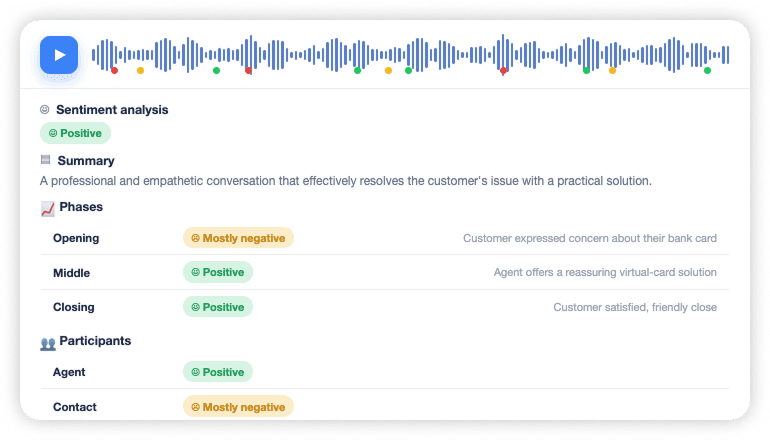
- Connected workflow: once a transcript is ready, sentiment analysis runs on top of it, showing the overall mood of the call along with a breakdown of how it evolved from beginning to middle to end, with positive and negative moments marked directly on the recording's waveform
- Editable summaries: AI generated summaries can be reviewed and adjusted by advisors when needed, with a full history of changes kept for traceability, and custom instructions can be configured to shape what each summary highlights
-CRM connected: transcripts, sentiment results, and summaries connect to your CRM, keeping everything attached to the customer's file
Your recordings already hold everything you need to improve quality, coach your teams, and better understand your customers. INO CX gives you the tools to unlock that value: automatic transcription, sentiment analysis, and summaries, available natively across your queues, voice campaigns, and voicemails. Get in touch to find out more.




Both modes exist. Real time transcription generates text as the conversation happens, which powers live agent assist tools and supervisor alerts. Post call transcription processes the recording after it ends, which is the standard approach for summaries, QA, and reporting use cases that do not require immediate action.
A transcript is a near word for word record of everything said during the call. A summary is a condensed, structured interpretation generated from that transcript, typically covering the reason for contact, key details, the outcome, and the customer's sentiment, built to be read in seconds rather than minutes.
No. The same transcription, sentiment, and summary pipeline applies to outbound voice campaigns and voicemails as well, which means missed calls, callback queues, and outbound performance reporting all benefit from the same structured data, not just live support conversations.
Most contact centers see measurable time savings within weeks of a pilot, since after call work and review time drop immediately once summaries and transcripts are available. Full rollout across all queues, campaigns, and voicemails typically follows a phased approach once accuracy is validated on the initial pilot.